Welcome
Welcome to my write-ups, papers, and guides for CTFs (Capture the Flag)! Included here are some of the CTF challenges I’ve completed and the methods I used to solve them.
Most CTF write-ups provide quick explanations of the answer to a challenge which can be very helpful! However, I believe it is important to know how and why things work the way they do so for each problem, there will be a quick solution followed by a detailed break-down of my thought process, successes, and failures at a beginner friendly level.
By dissecting these challenges, we’ll gain valuable insights and practical knowledge to enhance problem-solving abilities in cybersecurity.
PicoCTF
PicoCTF transforms the learning of hacking into a game through capture-the-flag puzzles! My aim is to present each write-up from a beginner's viewpoint, demonstrating a straightforward approach to solving the challenges and breaking down the problem-solving process.
The Challenge
- Name: Obedient Cat
- Description: This file has a flag in plain sight (aka "in-the-clear").
The Solution
- The name is the hint for this simple challenge, after downloading the file use the cat command in a terminal.
> cat flag
The Challenge
- Name: Mod 26
- Description: Cryptography can be easy, do you know what ROT13 is
cvpbPGS{arkg_gvzr_V'yy_gel_2_ebhaqf_bs_ebg13_jdJBFOXJ}
The Solution
- This is a simple ROT13 decode/decrypt challenge.
- Iterate through each character in the string, shifting the character 13 times, making sure to ignore numbers and punctuation.
- Using python
def decode_shift_cipher(cipher: str, shift_amount: int = 13):
	"""Shifts the alphabet characters in the provided string by `shift_amount` places"""
	flag = ""
	for c in cipher:
		if c.isalpha():
			base = ord('A') if c.isupper() else ord('a')
			c_shifted = (ord(c) - base + shift_amount) % 26
			c = chr(c_shifted + base)
		flag = f"{flag}{c}"
	return flag


flag = "cvpbPGS{arkg_gvzr_V'yy_gel_2_ebhaqf_bs_ebg13_jdJBFOXJ}"
print(decode_shift_cipher(flag))
The Steps
-
The description of the challenge gives us the cipher type of ROT13. ROT13 is a type of substitution cipher where each letter is shifted by 13 positions. For example, "Hello!" becomes "Uryyb!". todo()image for this example.
-
Mathematically we can convert a character to the encrypted character with the formula \(E_n(x)=(x+n)\text{ mod }26\), where \(x\) is the character's position in the alphabet, and decrypted with \(D_n(x)=(x-n)\text{ mod }26\). We can translate this to python like so:
def rot13_chr(c): base = ord('A') if c.isupper() else ord('a') c_shifted = (ord(c) - base + 13) % 26 print(chr(c_shifted + base)) -
But as you may notice, we're given a string of several characters! So lets use that function and modify it to translate each character in the string.
def rot13(flag: str): for c in flag: base = ord('A') if c.isupper() else ord('a') c_shifted = (ord(c) - base + 13) % 26 # end='' prevents a new line from printing after each char print(chr(c_shifted + base), end='') -
But we forgot one thing and that's the punctuation. Since the shift cipher won't properly work with non alphabet characters (like punctuation and symbols) in this case, we need to make sure we don't try and translate those.
def rot13(flag: str): for c in flag: if not c.isalpha(): print(c, end='') continue base = ord('A') if c.isupper() else ord('a') c_shifted = (ord(c) - base + 13) % 26 print(chr(c_shifted + base), end='') -
This function will now print out the flag correctly. But I wanna change it just slightly to make it a bit more usable.
def decode_shift_cipher(cipher: str, shift_amount: int = 13): """Shifts the alphabet characters in the provided string by `shift_amount` places""" flag = "" for c in cipher: if c.isalpha(): base = ord('A') if c.isupper() else ord('a') c_shifted = (ord(c) - base + shift_amount) % 26 c = chr(c_shifted + base) flag = f"{flag}{c}" return flag -
First we changed the definition and added another parameter
shift_amount. While we were focused on ROT13 for this exercise, the function is the same for any shift amount so why not keep it flexible. -
The second change we made is keeping the result in a string and building the result string with f-strings which are easy to understand and performant compared to other concatenation methods.
The Script - Line by Line
-
flag = ""- This creates an empty string for us to add characters to
-
for c in cipher: if c.isalpha():- Next, we're going to iterate through each letter in the decoded string, and ensure we only shift characters in the alphabet (A-Z/a-z).
-
base = ord('A') if c.isupper() else ord('a')- Each character in the string is going to be converted to an ASCII ordinal, since uppercase and lowercase letters have different ASCII ordinals, we're going to get the correct base.
c.isupper()- Checks if the charactercis uppercase.- If
cis uppercase,ord('A')(65) is saved tobase - If
cis lowercase,ord('a')(97) is saved tobase
- If
-
c_shifted = (ord(c) - base + shift_amount) % 26- We're going to convert the character to its ordinal and subtract the base so that the number representing the character is its position in the alphabet starting at 0 (
A:0, B:1, ..., Z:25) Then we add the shift amount. - The
% 26makes sure shifts wrap around. For exampleZis25.Z + 1 is 26.26 % 26 = 0which is now back toA. - Let's show an example of this:
- If
cis the letter'Q'andshift_amountis13:
basewill be equal toord('A')which is65.ord(c)which isQis equal to81- So
ord(c)-baseor81-65will be equal to16 - We add the shift amount,
13, to and add that to the previous result to get29, which is modulo'd with26,c_shifted = 29 % 26 = 3.c_shifted = 3, which representsDin the alphabet.
- If
- We're going to convert the character to its ordinal and subtract the base so that the number representing the character is its position in the alphabet starting at 0 (
-
c = chr(c_shifted + base)- Now we add back the base to the shifted letter, converting the it back to an ASCII ordinal, and save the result.
- Continuing our example from Step 4:
base=65andc_shifted=3:
- We add back the base to get the ASCII ordinal
3 + 65 = 68(the ASCII ordinal ofD) - And convert the ordinal back to a character with
chr(68).
-
flag = f"{flag}{c}"- We combine our string saved in
flagcurrently with the decoded letterc, appending a new character each iteration of the loop.
- We combine our string saved in
-
return flag- After we decode every letter in
cipherwe return the result.
- After we decode every letter in
The Challenge
- Name: Python Wrangling
- Description: Python scripts are invoked kind of like programs in the Terminal... Can you run this Python script using this password to get the flag?
The Solution
- With python installed, use the following command in a terminal
> cat pw.txt | python ende.py -d flag.txt.en
The Steps
The Source Code
-
Having some knowledge of Python helps to review the source code. Let's interpret it in chunks:
import sys import base64 from cryptography.fernet import Fernet- We're importing the
syslibrary which looks like it's used to handle the CLI arguments. - The
base64library, which looks to encode some sort of password - And
Fernetwhich seems to be an easy to use symmetric encryption class.
usage_msg = "Usage: "+ sys.argv[0] +" (-e/-d) [file]" help_msg = usage_msg + "\n" +\ "Examples:\n" +\ " To decrypt a file named 'pole.txt', do: " +\ "'$ python "+ sys.argv[0] +" -d pole.txt'\n" if len(sys.argv) < 2 or len(sys.argv) > 4: print(usage_msg) sys.exit(1)- We have a usage message and a help message. The help message looks... helpful, and provides instruction to decrypt what I assume is the encrypted
flag.txt.enflag. - It looks like the usage message prints when either too few or too many CLI arguments are passed to the program.
if sys.argv[1] == "-e": ... data_c = c.encrypt(data) sys.stdout.write(data_c.decode()) elif sys.argv[1] == "-d": ... data_c = c.decrypt(data.encode()) sys.stdout.buffer.write(data_c)- The
-eoption encrypts the data, the-doption decrypts.
- We're importing the
The Terminal Bits
-
After verifying the source code is magically harmless let's run it and see what happens.
> python ende.py Usage: ende.py (-e/-d) [file]- As expected the usage string prints.
-
Let's try following the help message. We can read it better by passing in the flag
-h.> python ende.py -h Usage: ende.py (-e/-d) [file] Examples: To decrypt a file named 'pole.txt', do: '$ python ende.py -d pole.txt' -
Now let's try passing in our encrypted flag file
> python ende.py -d flag.txt.en Please enter the password: -
Now we can copy and paste the password from the
pw.txtfile or:> cat pw.txt | python ende.py -d flag.txt.en- The flag prints out to the terminal.
TexSaw 2024
The Challenge
- Name: Ask, and It Shall Be Given to You
- Description: The flag is at
ip:port. Unfortunately it seems like the site is down right now :( . Maybe you can ask someone for help? Don't blow up their inbox though :) and make sure you clearly tell them what you want. - Category: Web
- Points: 250
The Solution
- We need to send a
POSTrequest to the URLip:port/contactITwith the following headers and data:POST /contactIT HTTP/1.1 Host: ip:port User-Agent: Mozilla/5.0 (X11; Linux x86_64; rv:109.0) Gecko/20100101 Firefox/115.0 Accept: text/html,application/xhtml+xml,application/xml;q=0.9,image/avif,image/webp,*/*;q=0.8 Accept-Language: en-US,en;q=0.5 Accept-Encoding: gzip, deflate Connection: keep-alive Cookie: role=user Content-Type: application/json Upgrade-Insecure-Requests: 1 {"email": "your_email@email.com", "messege": "flag"}
-
The easiest way to do this is with curl
curl -X POST \
	-d '{"email": "your_email@email.com", "messege": "flag"}' \
	-H "Content-Type: application/json"  \
	ip:port/contactIT
- Check your email for the flag
texsaw{7h15_15_7h3_r34l_fl46_c0n6r47ul4710n5}
The Steps
The Discovery
-
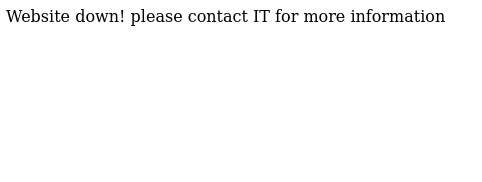
We get an interesting hint in the challenge description of 'Don't blow up their inbox'. To investigate further let's go to the provided ip and port and see what's there.
-
Now I am terrible at seeing things right in front of me ("contact IT") and I was too busy thinking about cranes to be thinking about robots, so after seeing the error
Website down! please contact IT for more information, I ran a fuzzer which places words from a wordlist where the phraseFUZZin in the commandffuf -w Discovery/Web-Content/common.txt -u http://ip:port/FUZZffuf -w Discovery/Web-Content/common.txt -u http://ip:port/FUZZ /'___\ /'___\ /'___\ /\ \__/ /\ \__/ __ __ /\ \__/ \ \ ,__\\ \ ,__\/\ \/\ \ \ \ ,__\ \ \ \_/ \ \ \_/\ \ \_\ \ \ \ \_/ \ \_\ \ \_\ \ \____/ \ \_\ \/_/ \/_/ \/___/ \/_/ v2.1.0-dev ________________________________________________ :: Method : GET :: URL : http://ip:port/FUZZ :: Wordlist : FUZZ: Discovery/Web-Content/common.txt :: Follow redirects : false :: Calibration : false :: Timeout : 10 :: Threads : 40 :: Matcher : Response status: 200-299,301,302,307,401,403,405,500 ________________________________________________ console [Status: 200, Size: 1563, Words: 330, Lines: 46, Duration: 41ms] robots.txt [Status: 200, Size: 61, Words: 13, Lines: 4, Duration: 42ms] :: Progress: [4727/4727] :: Job [1/1] :: 505 req/sec :: Duration: [0:00:11] :: Errors: 0 :: -
And results! There's two found items in the short wordlist we used
/consoleand/robots.txt./consoleis an admin console for Werkzeug which is a library for building web applications in python, it's not related to the solution./robots.txton the other hand could be very useful! Whenever a website is placed on the public web, people can of course visit the site. But people aren't the only thing to visit. The web is full of automated bots and web crawlers which are like little digital spiders which endlessly traverse the web. Once they find your site they report back to big brother about what they see, adding pages to search engines, and logs, and sites like archive.org. The/robots.txtfile is a request to those spiders and bots to not visit, log, or archive the pages listen within the file. (Note: Keyword there being request, nothing forces the crawlers to listen). That said, let's visit therobot.txtfile,ip:port/robots.txtUSER AGENTS: * DISALLOW contactIT DISALLOW countdown -
Here we see two pages
contactIT, which now seems obvious from the challenge description, andcountdown. Let's visitcontactITfirst.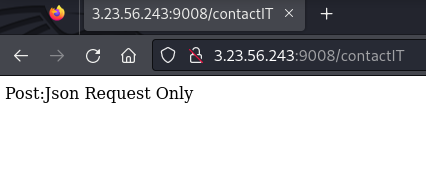
- The message
Post:Json Request Only, tells us exactly what it wants, JSON in a POST request. Let's save this page and visitcountdownquickly.
- The message
-
Visiting
countdownleads us to this page with the background of Pennywise from "It" and the uppercase letters27 YEARS. The HTML is masterclass worthy.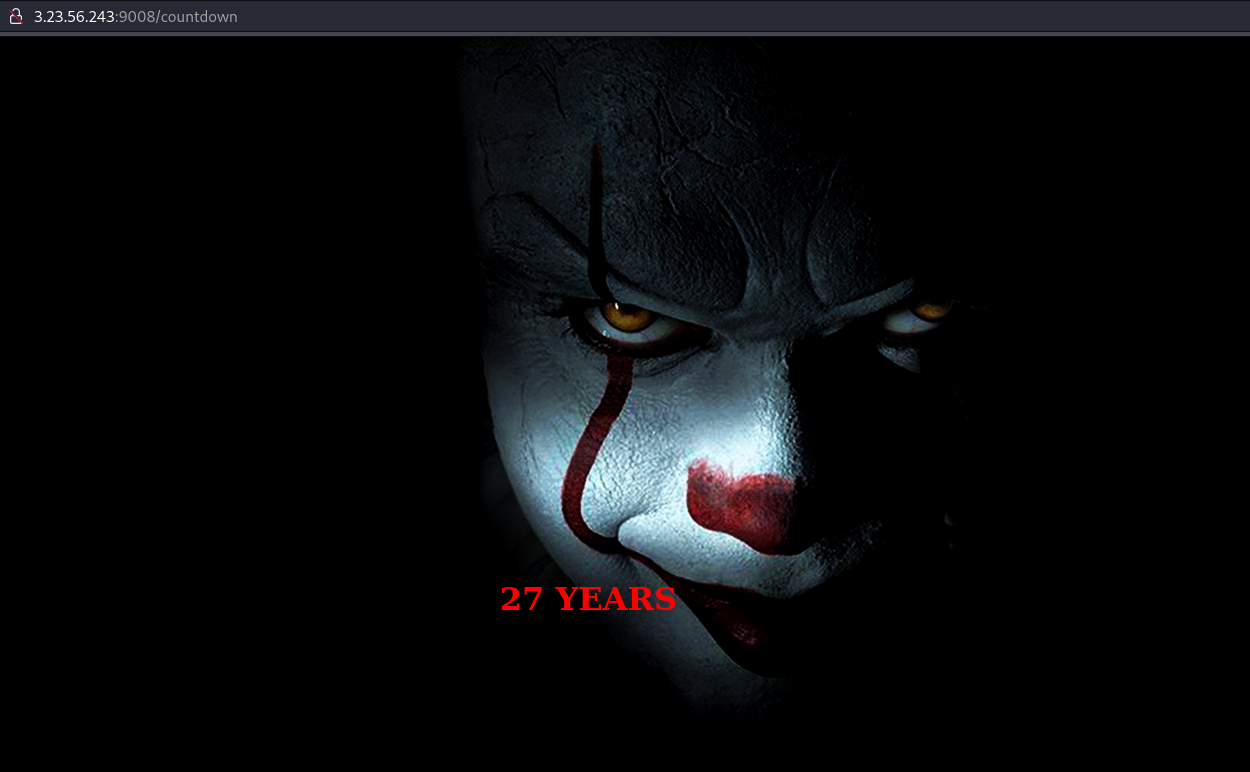
<!DOCTYPE html>
<html>
<body background="static/pennywise.png">
<head>
<style>
body {
color:red;
}
</style>
</head>
<center>
<br><br><br><br><br><br><br><br><br><br><br><br><br><br><br><br><br><br><br><br><br><br><br><br><br><br><br>
<h1>27 YEARS</h1>
</body>
</html>
The Requests
- When we visit a web page, this is what our request looks likes. From the top line we know it's a GET, and the resource we're requesting is the
contactITpage. Everything after the first line, are our headers which show things like our browser, what type of data we accept, our language, compression, cookies and so on.GET /contactIT HTTP/1.1 Host: ip:port User-Agent: Mozilla/5.0 (X11; Linux x86_64; rv:109.0) Gecko/20100101 Firefox/115.0 Accept: text/html,application/xhtml+xml,application/xml;q=0.9,image/avif,image/webp,*/*;q=0.8 Accept-Language: en-US,en;q=0.5 Accept-Encoding: gzip, deflate Connection: keep-alive Cookie: role=user Upgrade-Insecure-Requests: 1 - However we know when we visited the
contactITpage it wanted a POST.
-
So using curl or your favorite proxy like Caido or Burp, let's change just that first line and see what happens.
POST /contactIT HTTP/1.1
Host: ip:port
User-Agent: Mozilla/5.0 (X11; Linux x86_64; rv:109.0) Gecko/20100101 Firefox/115.0
Accept: text/html,application/xhtml+xml,application/xml;q=0.9,image/avif,image/webp,*/*;q=0.8
Accept-Language: en-US,en;q=0.5
Accept-Encoding: gzip, deflate
Connection: keep-alive
Cookie: role=user
Upgrade-Insecure-Requests: 1
Unsupported Media Type Did not attempt to load JSON data because the request Content-Type was not 'application/json'. -
Another error message! Progress! Now the page is a bit upset because it just wants JSON, nothing else. Let's add that restriction,
Content-Type: application/jsonto our POST.POST /contactIT HTTP/1.1 ... Content-Type: application/jsonBad Request Failed to decode JSON object: Expecting value: line 1 column 1 (char 0) -
And one more request issue. We said we were going to send the site JSON, but we didn't. At this point we have no idea what content of the JSON needs to be, so I'm going to send a simple name:value payload
{"test": "123"}to see what happens.POST /contactIT HTTP/1.1 ... Content-Type: application/json {"test": "123"}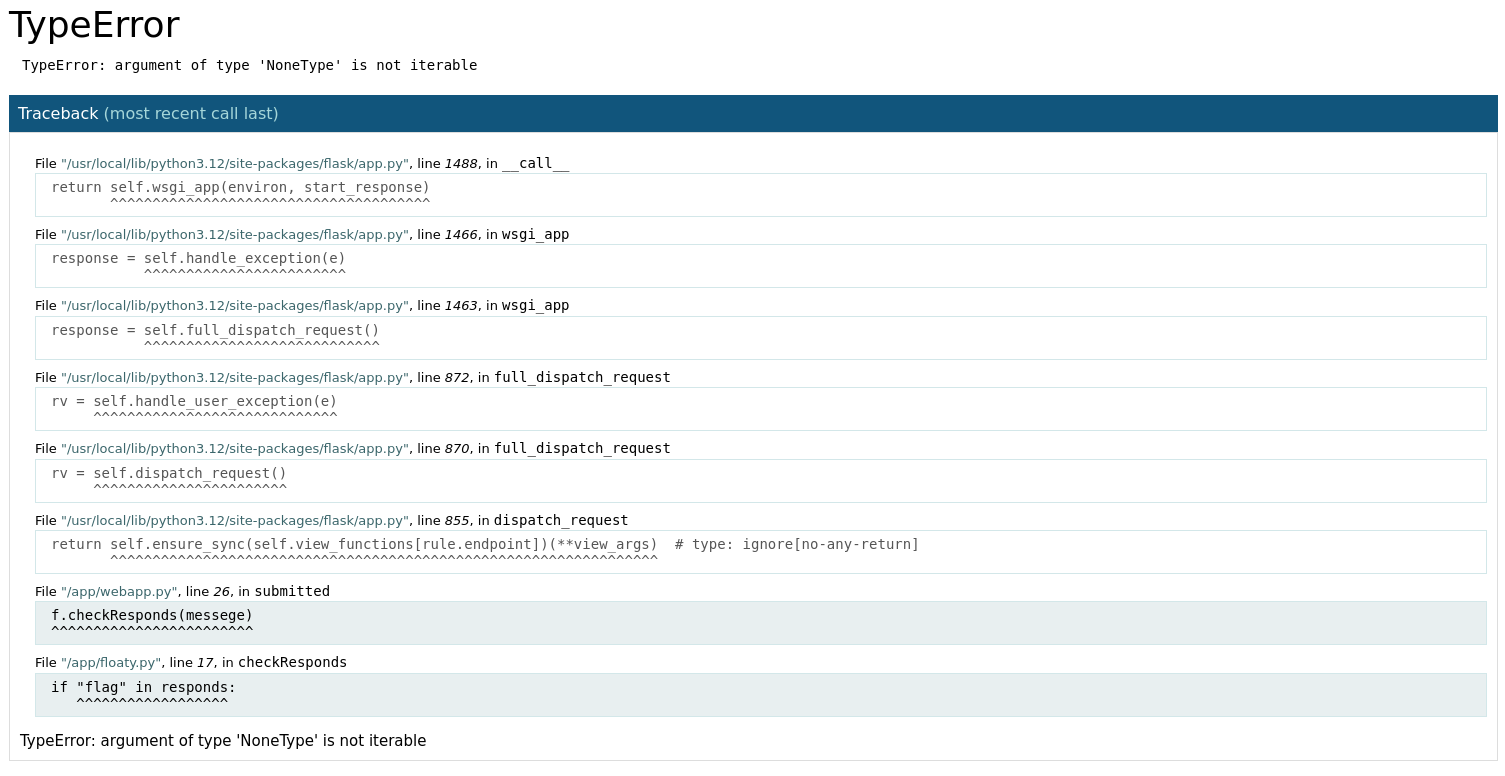
-
And another error, but error-ier. Let's click on the highlighted trace messages to expand them.
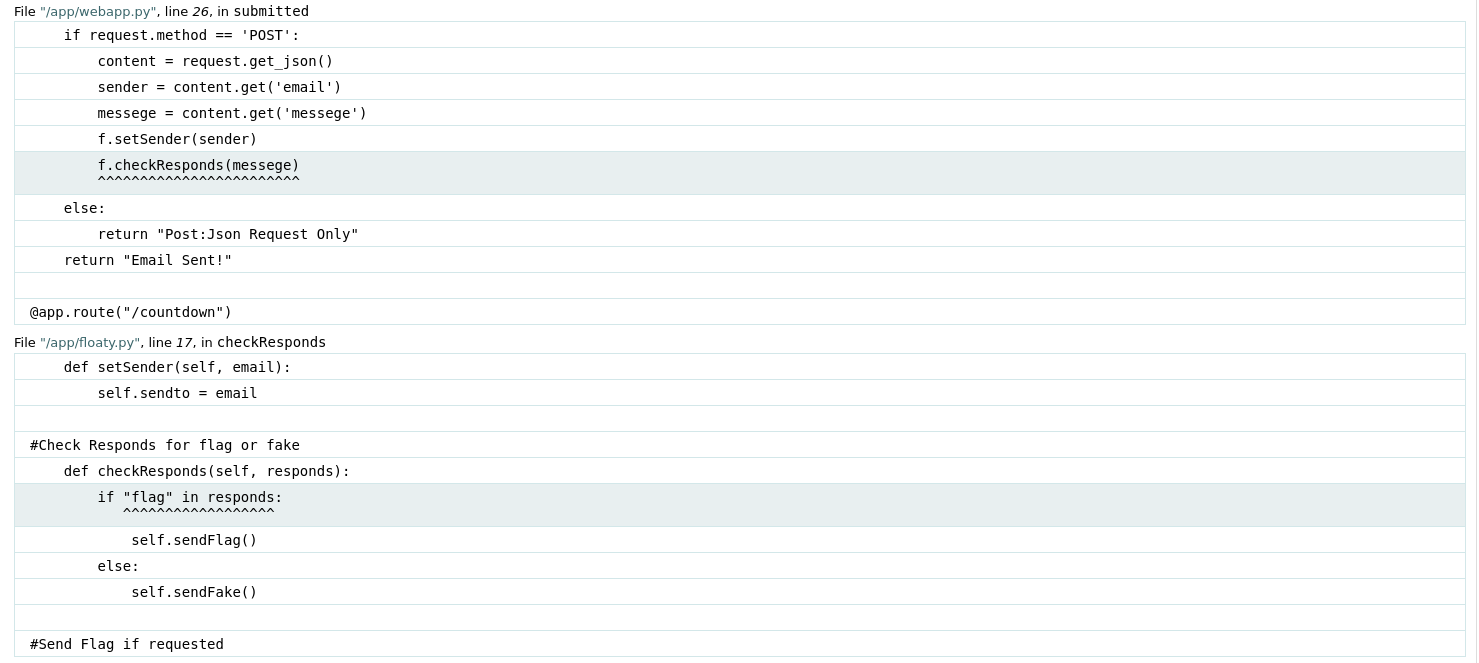
File "/app/webapp.py", line 26, in submitted if request.method == 'POST': content = request.get_json() sender = content.get('email') messege = content.get('messege') f.setSender(sender) f.checkResponds(messege) ^^^^^^^^^^^^^^^^^^^^^^^^ else: return "Post:Json Request Only" return "Email Sent!" @app.route("/countdown") File "/app/floaty.py", line 17, in checkResponds def setSender(self, email): self.sendto = email #Check Responds for flag or fake def checkResponds(self, responds): if "flag" in responds: ^^^^^^^^^^^^^^^^^^ self.sendFlag() else: self.sendFake() -
So this shows us that the web app is having trouble with two functions in two python modules.
- The first,
webapp.pyretrieves our JSON payload, looks for the nameemailandmessege, sets the sender to the value ofemailand then checks the value ofmessege. (Note: The spelling of 'messege', which I spent way too long not doing). Finally we see@app.route("/countdown")which is binding a function to the/countdownpage, seemingly tying the flag and Pennywise together. Interesting. - The second function is
floaty.pywhich verifies the flag and sends either a fake or real flag. Now if you have ever read or seen "It", I'm sorry, it's bizarre, but also we know thatfloatyseems like a direct tie to the clown. Let's try a few requests using some clown related things as our messege payload, and our email to hopefully receive the flag. Since the headers stay the same I'll only show the JSON data.
- The first,
-
The first payload I attempted was
{"email": "my_email@email.com","messege": "27 YEARS"}, you know, that big red text which is clearly the secret. Quite pleased with myself, I received an email notification, opened it up and saw the messageTh15_15_n0t_Th3_flA9_trY_a9a1n. Not ready to believe this fate, I wrapped the message intexsaw{}and tried to submit it, it didn't work. Darn :( -
Let's look at some other variations which all led to the same fake flag:
{"email": "my_email@email.com","messege": "1997"}(2024 - 27){"email": "my_email@email.com","messege": "pennywise"}{"email": "my_email@email.com","messege": "pennywise.png"}{"email": "my_email@email.com","messege": "countdown"}{"email": "my_email@email.com","messege": "AAAAAAA"}
-
We're missing something. Revisiting the challenge description, the last sentence "make sure you clearly tell them what you want", Led me to think about what I wanted (other than happiness, stability, and all that nonsense). The flag! I want the darn flag! I sent the payload
{"email": "my_email@email.com","messege": "flag"}, received that notifiction and boomtexsaw{7h15_15_7h3_r34l_fl46_c0n6r47ul4710n5}- The clown was quite literally a red herring. Devious.
The Challenge
-
Name: Market Data
-
Description: This challenge uses the same db file as the challenge "PS2 games". I’m curious about the recent market in action games. Find the total revenue generated by the 5th most revenue generating game in the Action genre in the last year (2023). Revenue is equal to the subtotal times quantity for a given order details. Some games have the same name because they're reboots of older games, make sure to group them up by id instead of by title! Do not pay attention to discounts, the order's total_amount (that includes services), or the price of the game itself (I haggle on them anyway). Flag Format:
texsaw{x}wherexis a number in decimal format precise to two decimal places -
Category: Miscellaneous, SQL
-
Points: 50
The Solution
-
With the description, we are also provided an SQL file
db.sql -
Import the file into MySQL:
> sudo mysql -u root -psource ./db.sql
-
Run the following query
SELECT sum(quantity * subtotal) AS total_revenue
FROM OrderDetails
WHERE game_id IN (
	SELECT game_id
	FROM Games
	NATURAL INNER JOIN Genres
	WHERE genre_name = "Action"
)
AND order_id in (
	SELECT order_id
	FROM Orders
	WHERE YEAR(order_date) = 2023
)
GROUP BY game_id
ORDER BY total_revenue DESC
LIMIT 5;
+---------------+ | total_revenue | +---------------+ | 434.84 | | 320.39 | | 297.39 | | 258.38 | | 247.16 | +---------------+ -
The answer is the last row in the column
total_revenue,247.16. -
Format the total into the flag
texsaw{247.16}
The Steps
Five Second Database Run-Down
- SQL stands for Structured Query Language and is a language to perform operations on data, commonly used for relational databases.
- A database contains tables which typically represent a single entity (person, place, thing, etc.) or a relationship between two entities.
- A table's rows are labelled by attributes, which describe the entity or relationship.
- Relational databases use keys to form relations.
- The primary key identifies the entity in a table
- A foreign key identifies a different entity that's related to the primary
- There are a lot of rules for data in a relational database but the most important is the primary key can not be null.
Collecting Information
- First let's gather they key information from the challenge description:
- Find the total revenue generated by the 5th most revenue generating game in the Action genre in the last year (2023).
- Revenue is equal to the subtotal times quantity for a given order details.
- Some games have the same name because they're reboots of older games, make sure to group them up by id instead of by title!
- In addition to the challenge description, we are provided a
db.sqlfile which contains a set of SQL queries. Let's open the file in a text editor to see what's happening:- First, a brand new iteration of the database
gamestoreis created and switched to.-- Create the database DROP DATABASE IF EXISTS gamestore; CREATE DATABASE IF NOT EXISTS gamestore; -- Switch to the created database USE gamestore; - Then a lot of tables inside the
gamestoredatabase are created.-- Create Clients Table CREATE TABLE Clients ... ... -- Create Wishlists Table CREATE TABLE Wishlists ... - Finally data is inserted into their respective tables.
insert into Clients (first_name, last_name, email, phone_number, address) values ('Selie', 'O''Hickee', 'sohickee0@live.com', '6412716528', '85482 8th Point');
...
insert into Wishlists (client_id, game_id, added_date) values (176, 409, '2023-10-08');
- First, a brand new iteration of the database
- Now that we know what's happening, let's examine the structure of the important tables using the key information from Step 1. The important tables we need to worry about are
Games,Genres,Orders, andOrderDetails.
Finding the Action Games
- Examining the
Gamestable:CREATE TABLE Games ( game_id INT AUTO_INCREMENT PRIMARY KEY, title VARCHAR(255), genre_id INT, release_date DATE, price DECIMAL(10, 2), publisher_id INT, FOREIGN KEY (genre_id) REFERENCES Genres(genre_id), FOREIGN KEY (publisher_id) REFERENCES Publishers(publisher_id) );- When looking through the details of a game the two things that catch my attention is the
game_idand thegenre_id. - We see that the
genre_idis a foreign key pointing to theGenrestable, and since we know we only want to consider action games in our result, let's look at that next.
- When looking through the details of a game the two things that catch my attention is the
- Examining the
Genrestable:CREATE TABLE Genres ( genre_id INT AUTO_INCREMENT PRIMARY KEY, genre_name VARCHAR(50) );-
This table is much simpler than the Games table, showing only the
genre_idand thegenre_name. I'm curious whatgenre_idties to action games:SELECT * FROM Genres; +----------+--------------+ | genre_id | genre_name | +----------+--------------+ | 1 | Action | ... -
The id which ties to action games is
1. Now let's use this table and select only the action games from theGamestable.SELECT * FROM Games NATURAL INNER JOIN Genres WHERE genre_name = "Action"; -- or the simpler: SELECT * FROM Games WHERE genre_id=1;+----------+---------+-------------------------------+--------------+-------+--------------+------------+ | genre_id | game_id | title | release_date | price | publisher_id | genre_name | +----------+---------+-------------------------------+--------------+-------+--------------+------------+ | 1 | 6 | Beneath the Cybersea | 1988-05-24 | 10.34 | 19 | Action | ... 44 rows in set (0.001 sec)
-
- We can see that there are
44action games and more importantly, we now have the first key to answering the challenge:SELECT game_id FROM Games NATURAL INNER JOIN Genres WHERE genre_name = "Action";
Finding The Orders in 2023
- Examining the
Orderstable:CREATE TABLE Orders ( order_id INT AUTO_INCREMENT PRIMARY KEY, client_id INT, order_date DATE, total_amount DECIMAL(10, 2), FOREIGN KEY (client_id) REFERENCES Clients(client_id) );- In this table we see the
order_date, which of course is typeDATE. Let's select all of the orders which occurred in 2023.SELECT * FROM Orders WHERE YEAR(order_date) = 2023;+----------+-----------+------------+--------------+ | order_id | client_id | order_date | total_amount | +----------+-----------+------------+--------------+ | 1 | 1 | 2023-06-18 | 112.64 | ... 922 rows in set (0.001 sec)
- In this table we see the
- This gives us the second piece of the challenge
SELECT order_id FROM Orders WHERE YEAR(order_date) = 2023;
Finding the Game Revenue
-
Examining the
OrderDetailstable:CREATE TABLE OrderDetails ( order_detail_id INT AUTO_INCREMENT PRIMARY KEY, order_id INT, game_id INT, quantity INT, subtotal DECIMAL(10, 2), FOREIGN KEY (order_id) REFERENCES Orders(order_id), FOREIGN KEY (game_id) REFERENCES Games(game_id) );- This is the final piece of the challenge, here we see a foreign key
order_idpointing to theOrderstable, the foreign keygame_idwhich points to theGamestable, thequantityof games sold, and finally thesubtotalof the order.
- This is the final piece of the challenge, here we see a foreign key
-
First, let's find only the order details which involved an action game using our first query.
SELECT *
FROM OrderDetails
WHERE game_id IN (
	SELECT game_id
	FROM Games
	NATURAL INNER JOIN Genres
	WHERE genre_name = "Action"
);
+-----------------+----------+---------+----------+----------+ | order_detail_id | order_id | game_id | quantity | subtotal | +-----------------+----------+---------+----------+----------+ | 43 | 43 | 6 | 1 | 67.70 | ... 78 rows in set (0.001 sec) -
We can see there are a total of 78 rows in
OrderDetailswhich involve action games. Now let's add therevenueSELECT *, (quantity * subtotal) AS revenue -- added revenue FROM OrderDetails WHERE game_id IN ( SELECT game_id FROM Games NATURAL INNER JOIN Genres WHERE genre_name = "Action" );+-----------------+----------+---------+----------+----------+---------+ | order_detail_id | order_id | game_id | quantity | subtotal | revenue | +-----------------+----------+---------+----------+----------+---------+ | 43 | 43 | 6 | 1 | 67.70 | 67.70 | ... 78 rows in set (0.001 sec) -
Now that we have the
revenuefor each order detail, we need to combine (or group) the results for each game and sum the total per game.SELECT *, sum(quantity * subtotal) AS total_revenue -- added sum FROM OrderDetails WHERE game_id IN ( SELECT game_id FROM Games NATURAL INNER JOIN Genres WHERE genre_name = "Action" ) GROUP BY game_id; -- added group by+-----------------+----------+---------+----------+----------+---------------+ | order_detail_id | order_id | game_id | quantity | subtotal | total_revenue | +-----------------+----------+---------+----------+----------+---------------+ | 43 | 43 | 6 | 1 | 67.70 | 141.91 | ... 38 rows in set (0.003 sec) -
These results sum the revenue for each game and places the result into the
total_revenuecategory. Now that we know the numbers, we need to restrict the results further to only include orders which took place in 2023 using our second query.SELECT *, sum(quantity * subtotal) AS total_revenue FROM OrderDetails WHERE game_id IN ( SELECT game_id FROM Games NATURAL INNER JOIN Genres WHERE genre_name = "Action" ) AND order_id in ( -- added the second nested query SELECT order_id FROM Orders WHERE YEAR(order_date) = 2023 ) GROUP BY game_id;+-----------------+----------+---------+----------+----------+---------------+ | order_detail_id | order_id | game_id | quantity | subtotal | total_revenue | +-----------------+----------+---------+----------+----------+---------------+ | 43 | 43 | 6 | 1 | 67.70 | 141.91 | ... 37 rows in set (0.002 sec) -
Lastly, we need to sort the results, we can also remove the unneeded columns from the results and just keep the
total_revenue. I also limited the rows to5since we only need the 5th highest revenue.SELECT sum(quantity * subtotal) AS total_revenue -- removed the glob (*) FROM OrderDetails WHERE game_id IN ( SELECT game_id FROM Games NATURAL INNER JOIN Genres WHERE genre_name = "Action" ) AND order_id in ( SELECT order_id FROM Orders WHERE YEAR(order_date) = 2023 ) GROUP BY game_id ORDER BY total_revenue DESC -- added the sort and limit LIMIT 5;+---------------+ | total_revenue | +---------------+ | 434.84 | | 320.39 | | 297.39 | | 258.38 | | 247.16 | +---------------+ -
The last item in the column is our answer, format that into the flag and we're done!
texsaw{247.16}
The Challenge
-
Name: Crypto Trail
-
Description: Uh oh, looks like my friend thought using multiple crypto algorithms meant he'd be safer! Show him it's quality over quantity!
Cyphertext:
00110101 01100001 00100000 00110011 00110011 00100000 00110100 01100001 00100000 00110111 00110010 00100000 00110101 01100001 00100000 00110110 01100100 00100000 00110011 00110101 00100000 00110111 00110001 00100000 00110110 00110101 00100000 00110011 00110010 00100000 00110110 00110100 00100000 00110100 00110110 00100000 00110110 00110010 00100000 00110110 01100001 00100000 00110100 00110110 00100000 00110101 01100001 00100000 00110101 01100001 00100000 00110110 01100011 00100000 00110011 00111001 00100000 00110110 01100011 00100000 00110101 00110011 00100000 00110100 00110111 00100000 00110100 00110110 00100000 00110110 00110110 00100000 00110110 00110011 00100000 00110100 00110100 00100000 00110100 00110010 00100000 00110101 01100001 00100000 00110101 00110101 00100000 00110101 00111000 00100000 00110011 00110000 00100000 00110011 01100100
-
Category: Cryptography
-
Points: 50
The Solution
- Convert each 8-bit binary string to an integer such that the integer represents the ASCII value of a character.
5a 33 4a 72 ...
- The characters of the string represent hexadecimal numbers, convert the hex back into ASCII to get a Base64 encoded string.
Z3JrZm5qe2dFbjFZZl9lSGFfcDBZUX0=
- Decode the Base64 string.
grkfnj{gEn1Yf_eHa_p0YQ}
- Decode the ROT13 encoded string into the flag:
texsaw{tRa1Ls_rUn_c0LD}
In Python
- Save to a file
script.py - Run with python
> python script.pyimport base64 def decode_shift_cipher(cipher: str, shift_amount: int = 13): """Shifts the alphabet characters in the provided string by `shift_amount` places""" flag = "" for c in cipher: if c.isalpha(): base = ord('A') if c.isupper() else ord('a') c_shifted = (ord(c) - base + shift_amount) % 26 c = chr(c_shifted + base) flag = f"{flag}{c}" return flag cipher_text = """00110101 01100001 00100000 00110011 00110011 00100000 00110100 01100001 00100000 00110111 00110010 00100000 00110101 01100001 00100000 00110110 01100100 00100000 00110011 00110101 00100000 00110111 00110001 00100000 00110110 00110101 00100000 00110011 00110010 00100000 00110110 00110100 00100000 00110100 00110110 00100000 00110110 00110010 00100000 00110110 01100001 00100000 00110100 00110110 00100000 00110101 01100001 00100000 00110101 01100001 00100000 00110110 01100011 00100000 00110011 00111001 00100000 00110110 01100011 00100000 00110101 00110011 00100000 00110100 00110111 00100000 00110100 00110110 00100000 00110110 00110110 00100000 00110110 00110011 00100000 00110100 00110100 00100000 00110100 00110010 00100000 00110101 01100001 00100000 00110101 00110101 00100000 00110101 00111000 00100000 00110011 00110000 00100000 00110011 01100100""" cipher_text = cipher_text.split() # Convert the cipher from binary to decimal, and then to characters. # ["00110101", "01100001", "00100000", "00110011"] =>'5a 33 4a 72 ...' hex_string = ''.join(chr(int(binary_str, 2)) for binary_str in cipher_text) # Convert the hex into ASCII shifted_string = bytes.fromhex(hex_string).decode() # shifted_string = 'grkfnj{gEn1Yf_eHa_p0YQ}' b64 = base64.b64decode(shifted_string).decode() print(decode_shift_cipher(b64, 13))
Using CyberChef
- The recipe is:
From_Binary('Space',8)
From_Hex('Space')
From_Base64('A-Za-z0-9+/=',true,false)
ROT13(true,true,false,13)
The Steps
1. Converting to Decimal
- The cipher text has several 8-bit binary strings separated by spaces. Since a byte is 8-bits and one character is a byte (in ASCII) there's a good chance that each of these 8-bit binary strings are characters. In order to find what character they may represent we need to convert the binary into decimal.
-
Manually
- To convert the binary to decimal by hand, we need to number each position from right-to-left starting at 0. For example:
0 0 1 1 0 1 0 1 7 6 5 4 3 2 1 0 - Then starting from left to right we multiply each binary bit by \(2\) to the power of the position \(n\), and sum the results.
- \((0 * 2 ^ 7) + (0 * 2 ^ 6) + (1 * 2 ^ 5) + (1 * 2 ^ 4) + (0 * 2 ^ 3) + (1 * 2 ^ 2) + (0 * 2 ^ 1) + (1 * 2 ^ 0)\)
- Since anything multiplied by \(0\) is \(0\), we can leave out the \( 0*2^n \)'s
- \( \rightarrow (1 * 2 ^ 5) + (1 * 2 ^ 4) + (1 * 2 ^ 2) + (1 * 2 ^ 0) \)
- \( \rightarrow 2 ^ 5 + 2 ^ 4 + 2 ^ 2 + 2 ^ 0 \)
- \( \rightarrow 32+16+4+1 \)
- \( \rightarrow 53 \)
- So \( 00110101_2=53_{10} \)
-
Luckily many languages, including python can do these conversions for us like so:
int("00110101", 2)
-
So let's convert each binary string to decimal
cipher_text = """00110101 ... 01100100""" # Copy the whole cipher text here

# Split the string by each space into an array.
#     "00110101 01100100" becomes ["00110101", "01100100"] and so on.
cipher_text = cipher_text.split()

# Iterate through each element
for binary_str in cipher_text:
    # Convert the binary to decimal and print the result
    print(int(binary_str, 2), end=" ")
# The result 53 97 32 51 51 32 52 97 32 55 50 32 53 97 32 54 100 32 51 53 32 55 49 32 54 53 32 51 50 32 54 52 32 52 54 32 54 50 32 54 97 32 52 54 32 53 97 32 53 97 32 54 99 32 51 57 32 54 99 32 53 51 32 52 55 32 52 54 32 54 54 32 54 51 32 52 52 32 52 50 32 53 97 32 53 53 32 53 56 32 51 48 32 51 100
-
2. Decimal to ASCII
- This indeed looks like a set of ASCII characters! Let's convert the integers to ASCII using
chr(n).for binary_str in cipher_text: n = int(binary_str, 2) print(chr(n), end="")# The result 5a 33 4a 72 5a 6d 35 71 65 32 64 46 62 6a 46 5a 5a 6c 39 6c 53 47 46 66 63 44 42 5a 55 58 30 3d
3. Hex to Decimal to ASCII
-
Those are hex characters! Let's save this output and convert the hex back to decimal using
int(n, 16). We're also going to modify our for loops and use list comprehension so that we can save the results to a variable.- Note: You can convert hex to decimal the same way you convert binary to decimal. But instead of 1's and 0's use 0-15 (A is 10, and F is 15) and multiply that by 16 instead of 2. For example:
- \( 5a_{16} = (5 * 16 ^ 1 + 10 * 16 ^ 0) _ {10} = 90_{10} \)
# Convert the cipher from binary to decimal, and then to characters.
# ["00110101", "01100001", "00100000", "00110011"] =>'5a 33 4a 72 ...'
hex_string = ''.join(chr(int(binary_str, 2)) for binary_str in cipher_text)

# Split the hex string by each space and save it as an array
#    '5a 33 4a 72 ...' => ['5a', '33', '4a', '72', ...]
hex_string = hex_string.split()

# Convert each hex element to decimal and print it
for hex_chr in hex_string:
	print(int(hex_chr, 16), end=" ")
# The result 90 51 74 114 90 109 53 113 101 50 100 ... - Note: You can convert hex to decimal the same way you convert binary to decimal. But instead of 1's and 0's use 0-15 (A is 10, and F is 15) and multiply that by 16 instead of 2. For example:
-
This once again, looks like ASCII ordinals. Let's convert these to characters using
chr(n)again.# Split the hex string by each space and save it as an array # '5a 33 4a 72 ...' => ['5a', '33', '4a', '72', ...] hex_string = hex_string.split() for hex_chr in hex_string: print(chr(int(hex_chr, 16)), end="")# The result Z3JrZm5qe2dFbjFZZl9lSGFfcDBZUX0=
4. Decoding Base64
-
Base64 allows binary data to be represented as printable characters by taking 6-bits of binary at a time, and converting that into a character. Notably, Base64 uses the
=symbol for padding, when you see a few=signs at the end of a string especially in the context of web traffic (or CTFs), there's a good chance it's a Base64 encoded string. So let's try and decode the string.# List comprehension for converting the hex to ascii characters hex_string = hex_string.split() hex_string = ''.join(chr(int(hex_chr, 16)) for hex_chr in hex_string) # Print the decoded Base64 print(base64.b64decode(hex_string).decode())# The result grkfnj{gEn1Yf_eHa_p0YQ}
5. Decrypting the Shift Cipher
- We can see from this result the structure of a flag. But the text doesn't quite seem there yet. We don't have any kind of key so it's unlikely to be a Vigenere Cipher, so we can try a simple shift cipher, increasing the shift until it looks right! (Alternatively, we can guess the first part of the flag and do basic subtraction but I feel the former is more instructive.)
-
Note: To learn how this code works line by line, I recommend reading this challenge.
# grkfnj{gEn1Yf_eHa_p0YQ}
b64 = base64.b64decode(hex_string).decode()
for shift in range(1, 26):
	print(f"Shift amount: {shift} - ", end="")
	for c in b64:
		if c.isalpha():
			base = ord('A') if c.isupper() else ord('a')
			c_shifted = (ord(c) - base + shift) % 26
			c = chr(c_shifted + base)
		print(c, end='')
	print("")
# The results Shift amount: 1 - hslgok{hFo1Zg_fIb_q0ZR} Shift amount: 2 - itmhpl{iGp1Ah_gJc_r0AS} Shift amount: 3 - juniqm{jHq1Bi_hKd_s0BT} Shift amount: 4 - kvojrn{kIr1Cj_iLe_t0CU} Shift amount: 5 - lwpkso{lJs1Dk_jMf_u0DV} Shift amount: 6 - mxqltp{mKt1El_kNg_v0EW} Shift amount: 7 - nyrmuq{nLu1Fm_lOh_w0FX} Shift amount: 8 - ozsnvr{oMv1Gn_mPi_x0GY} Shift amount: 9 - patows{pNw1Ho_nQj_y0HZ} Shift amount: 10 - qbupxt{qOx1Ip_oRk_z0IA} Shift amount: 11 - rcvqyu{rPy1Jq_pSl_a0JB} Shift amount: 12 - sdwrzv{sQz1Kr_qTm_b0KC} Shift amount: 13 - texsaw{tRa1Ls_rUn_c0LD} # THE FLAG! Shift amount: 14 - ufytbx{uSb1Mt_sVo_d0ME} Shift amount: 15 - vgzucy{vTc1Nu_tWp_e0NF} Shift amount: 16 - whavdz{wUd1Ov_uXq_f0OG} Shift amount: 17 - xibwea{xVe1Pw_vYr_g0PH} Shift amount: 18 - yjcxfb{yWf1Qx_wZs_h0QI} Shift amount: 19 - zkdygc{zXg1Ry_xAt_i0RJ} Shift amount: 20 - alezhd{aYh1Sz_yBu_j0SK} Shift amount: 21 - bmfaie{bZi1Ta_zCv_k0TL} Shift amount: 22 - cngbjf{cAj1Ub_aDw_l0UM} Shift amount: 23 - dohckg{dBk1Vc_bEx_m0VN} Shift amount: 24 - epidlh{eCl1Wd_cFy_n0WO} Shift amount: 25 - fqjemi{fDm1Xe_dGz_o0XP}
- Aha! There's the flag! Now we know the shift amount is 13, or more commonly a ROT13 cipher.
6. The Full Script
-
I made some slight changes to the code above:
- First, I moved the shift cipher logic into its own function (technically I reused the function from another solution I wrote)
- (Again, for reference on how a shift cipher works this will explain the function line by line)
- I made the hex to ASCII conversion a bit more robust with the instruction
bytes.fromhex(hex_string). - And finally I removed the
for shift in range(1, 26)loop since we know the shift amount is13.
import base64 def decode_shift_cipher(cipher: str, shift_amount: int = 13): """Shifts the alphabet characters in the provided string by `shift_amount` places""" flag = "" for c in cipher: if c.isalpha(): base = ord('A') if c.isupper() else ord('a') c_shifted = (ord(c) - base + shift_amount) % 26 c = chr(c_shifted + base) flag = f"{flag}{c}" return flag # PLACE FULL TEXT HERE cipher_text = """00110101 ... 01100100""" cipher_text = cipher_text.split() # Convert the cipher from binary to decimal, and then to characters. # ["00110101", "01100001", "00100000", "00110011"] =>'5a 33 4a 72 ...' hex_string = ''.join(chr(int(binary_str, 2)) for binary_str in cipher_text) # Convert the hex into ASCII shifted_string = bytes.fromhex(hex_string).decode() # shifted_string = 'grkfnj{gEn1Yf_eHa_p0YQ}' b64 = base64.b64decode(shifted_string).decode() print(decode_shift_cipher(b64, 13)) - First, I moved the shift cipher logic into its own function (technically I reused the function from another solution I wrote)
-
Run this script and the flag will print out:
texsaw{tRa1Ls_rUn_c0LD}
The Challenge
- Name: Tricky Tree
- Description: We've located the mastermind behind the infamous project ENARC. His name is Velasquez E Turrul. The only step remaining is to access his laptop, but the password is his father's birthday! Can you help stop project ENARC? Find the birthday of Velasquez E Turrul's father. Enter the flag in
MM_DD_YYYYformat Example:texsaw{03_23_2024} - Category: OSINT
- Points: 150
The Solution
- Visit https://www.familytreenow.com/trees/715273
- Go to
Enrique - Click view profile
2 Sep 1985 - Format the flag
texsaw{09_02_1985}
The Steps
The History
- ENARC (Crane backwards) is the false god proposed to overtake our savour Temoc. For a particular unknown reason, our university has a tendency to like things spelt in reverse. And after the placement of a crane on campus, students strayed from the teachings of Temoc in favor of Enarc... No, I didn't make most of that up.
The Rabbit Holes
- My first stop was to visit Google attempting the following queries
Velasquez E Turrul"Velasquez E Turrul"tree "Turrul""Turrul" EnarcVisions of EnarcEnarc 1980sThe Crane Bag
- All of which led to these interesting reads:
The Trade directory of Central America and the West IndiesPort of Los Angeles: Annual Report- A report about import and exports coming and going from the port of Los Angeles from 1913Visions of Enarc- A pair of paintings by the artist Barbara Crane- A great comic by The Mercury
The Crane Bag Book of Irish Studies (1977-1981)- A journal of Irish culture, history, and politics.
- Nevertheless, they were all red herrings, no doubt the intention of Enarc themself.
The Family Tree
- After scanning, reading, and spending an uncomfortable amout of time I decided to branch my searches to other search engines, away from Google. I started with DuckDuckGo (which I should note for comedic purposes is my default search engine), and it was the first result...
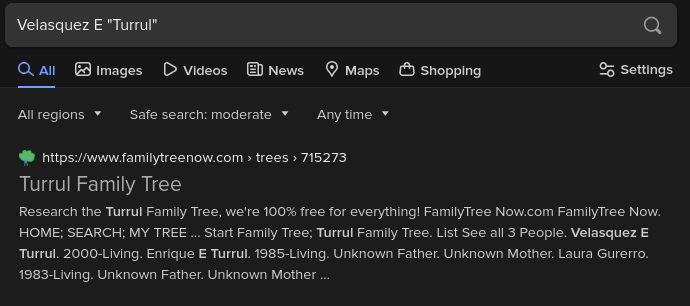
- After discovering the family tree site, I went to his father
Enrique, hit view profile, and found the birthday2 Sep 1985 - Formatting that into the flag we get
texsaw{09_02_1985}